
Paper Intelligence

Paper Intelligence is Researchist's extraction. It reads a paper on your device and produces the outline, section summaries and key points, figures, tables, equations, the reference list, and links from every in-text citation to its reference. Nothing is uploaded; the work is done by Apple Intelligence on your Mac, iPad, or iPhone.

Requirements

  • A Researchist Pro subscription.
  • A device that supports Apple Intelligence, with Apple Intelligence turned on in Settings › Apple Intelligence & Siri.

On devices without Apple Intelligence, Researchist shows an Apple Intelligence Required notice. You can still read, highlight, and organize papers.

Run extraction

  1. Open a paper.
  2. Open the inspector with the sidebar button in the toolbar and pick any tab, for example Outline.
  3. Tap Run Extraction. The first time, confirm the note that Paper Intelligence can make mistakes.
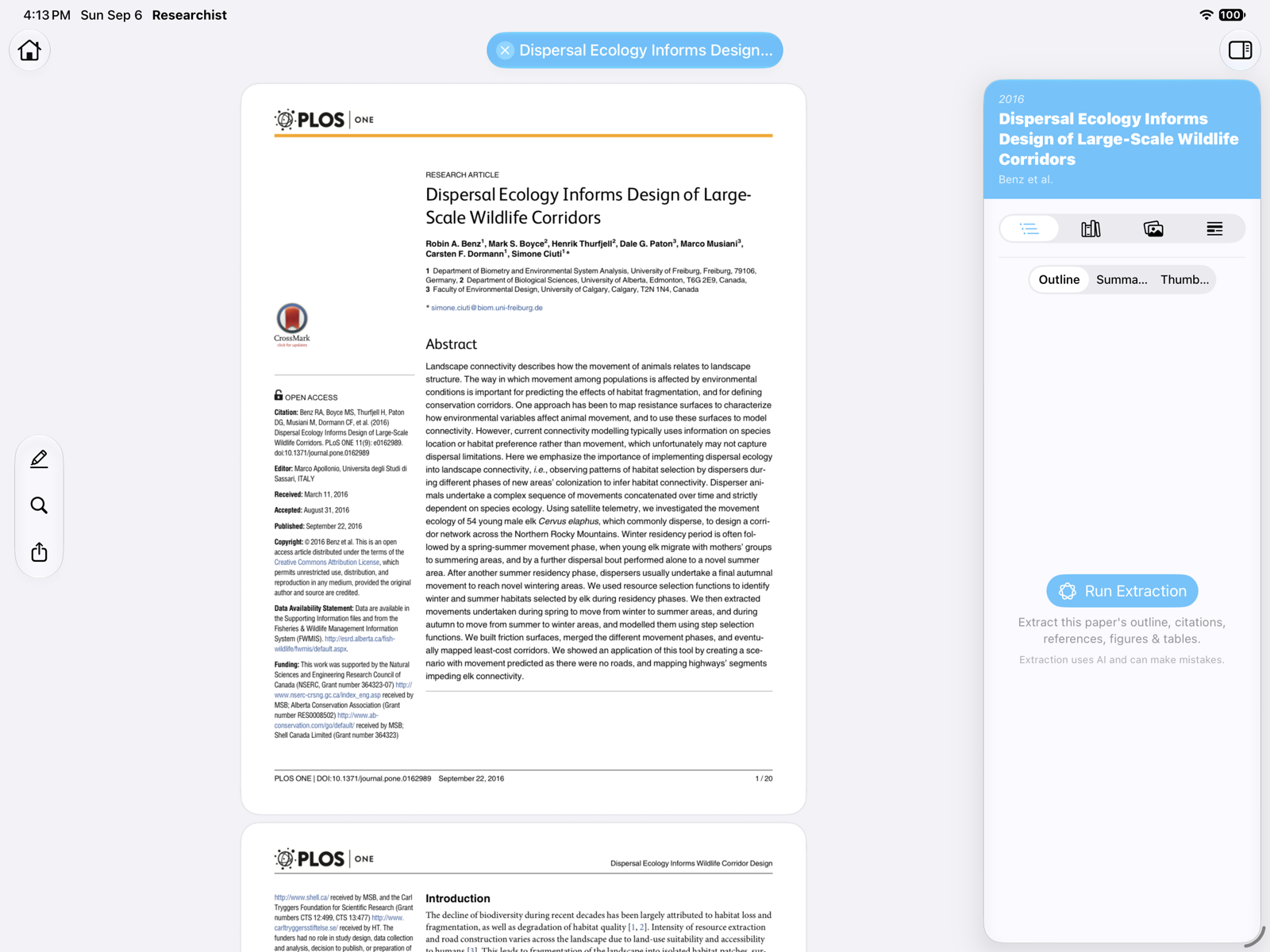
An unprocessed paper with the inspector open on the Outline tab and the Run Extraction button

A progress indicator in the toolbar shows the six stages: Analyzing Paper, Reviewing Structure, Writing Summaries, Finding References, Extracting Reference Details, and Mapping Citations. Tap the indicator to see where it is. You can keep reading while it runs, and the outline fills in as soon as it's ready. Papers are processed one at a time; a second paper waits until the first finishes.
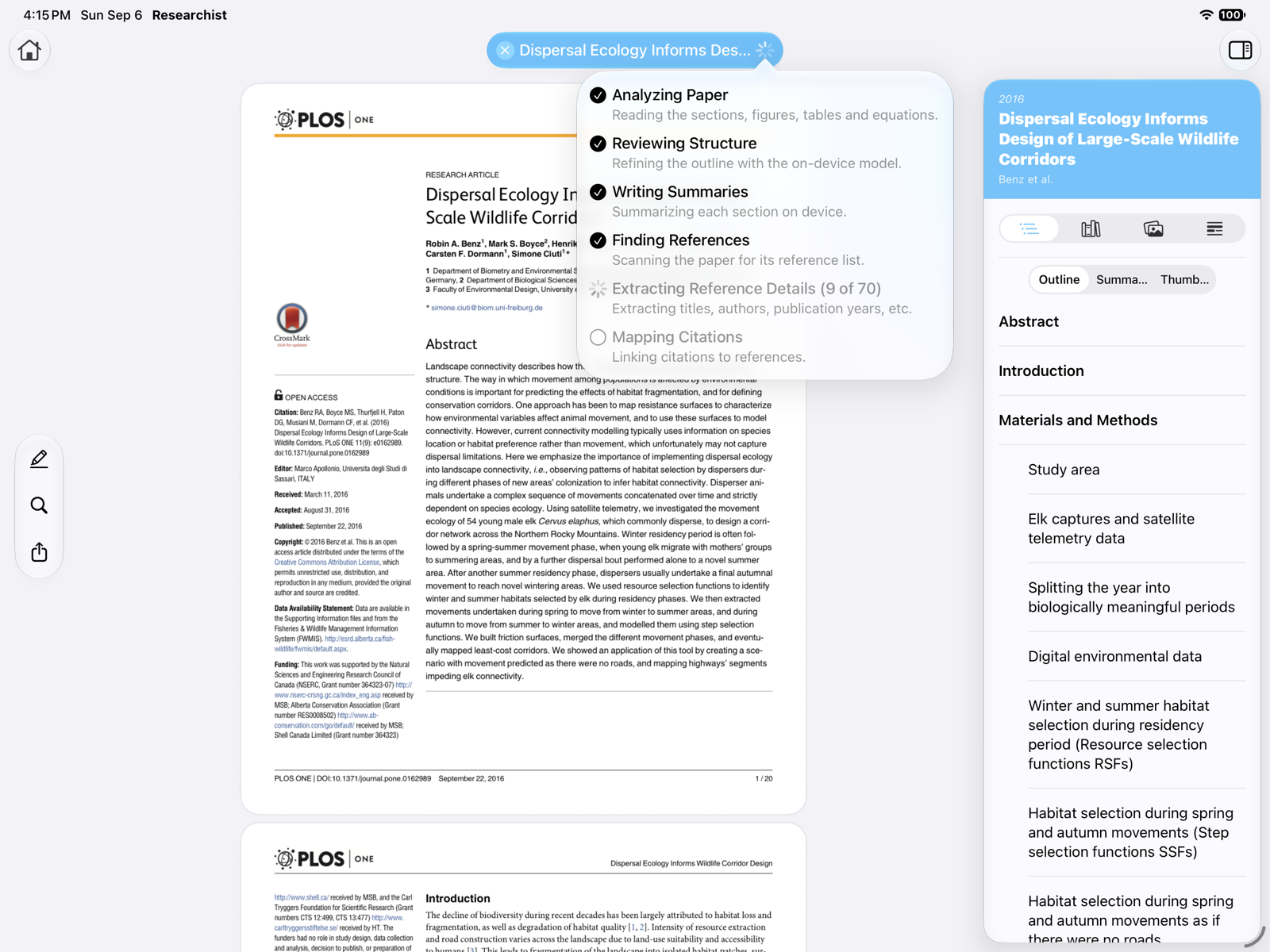
The extraction progress popover listing the six stages, with reference details in progress

Run it again

If a result looks wrong, choose Extract Again in the inspector, or Re-Extract from the paper's tab menu. Extraction picks up where it left off if it was interrupted, for example by closing the tab.

Accuracy

Extraction uses AI and can make mistakes: a missed reference, a summary that is off, or a figure caption attached to the wrong image. Treat the results as a fast map of the paper, not a substitute for reading it. Use Report Extraction Problem… in the tab menu to send us a paper that went wrong.

Paper Intelligence

Paper Intelligence is Researchist's extraction. It reads a paper on your device and produces the outline, section summaries and key points, figures, tables, equations, the reference list, and links from every in-text citation to its reference. Nothing is uploaded; the work is done by Apple Intelligence on your Mac, iPad, or iPhone.

Requirements

  • A Researchist Pro subscription.
  • A Mac that supports Apple Intelligence, with Apple Intelligence turned on in System Settings › Apple Intelligence & Siri.

On Macs without Apple Intelligence, Researchist shows an Apple Intelligence Required notice. You can still read, highlight, and organize papers.

Run extraction

  1. Open a paper.
  2. Open the inspector with the sidebar button in the toolbar and pick any tab, for example Outline.
  3. Click Run Extraction. The first time, confirm the note that Paper Intelligence can make mistakes.
An unprocessed paper with the inspector open on the Outline tab and the Run Extraction button

A progress indicator in the toolbar shows the six stages: Analyzing Paper, Reviewing Structure, Writing Summaries, Finding References, Extracting Reference Details, and Mapping Citations. Click the indicator to see where it is. You can keep reading while it runs, and the outline fills in as soon as it's ready. Papers are processed one at a time; a second paper waits until the first finishes.

The extraction progress popover listing the six stages, with reference details in progress

Run it again

If a result looks wrong, choose Extract Again in the inspector, or Re-Extract from the paper's tab menu. Extraction picks up where it left off if it was interrupted, for example by closing the tab.

Accuracy

Extraction uses AI and can make mistakes: a missed reference, a summary that is off, or a figure caption attached to the wrong image. Treat the results as a fast map of the paper, not a substitute for reading it. Use Report Extraction Problem… in the tab menu to send us a paper that went wrong.

Return to Help Center